

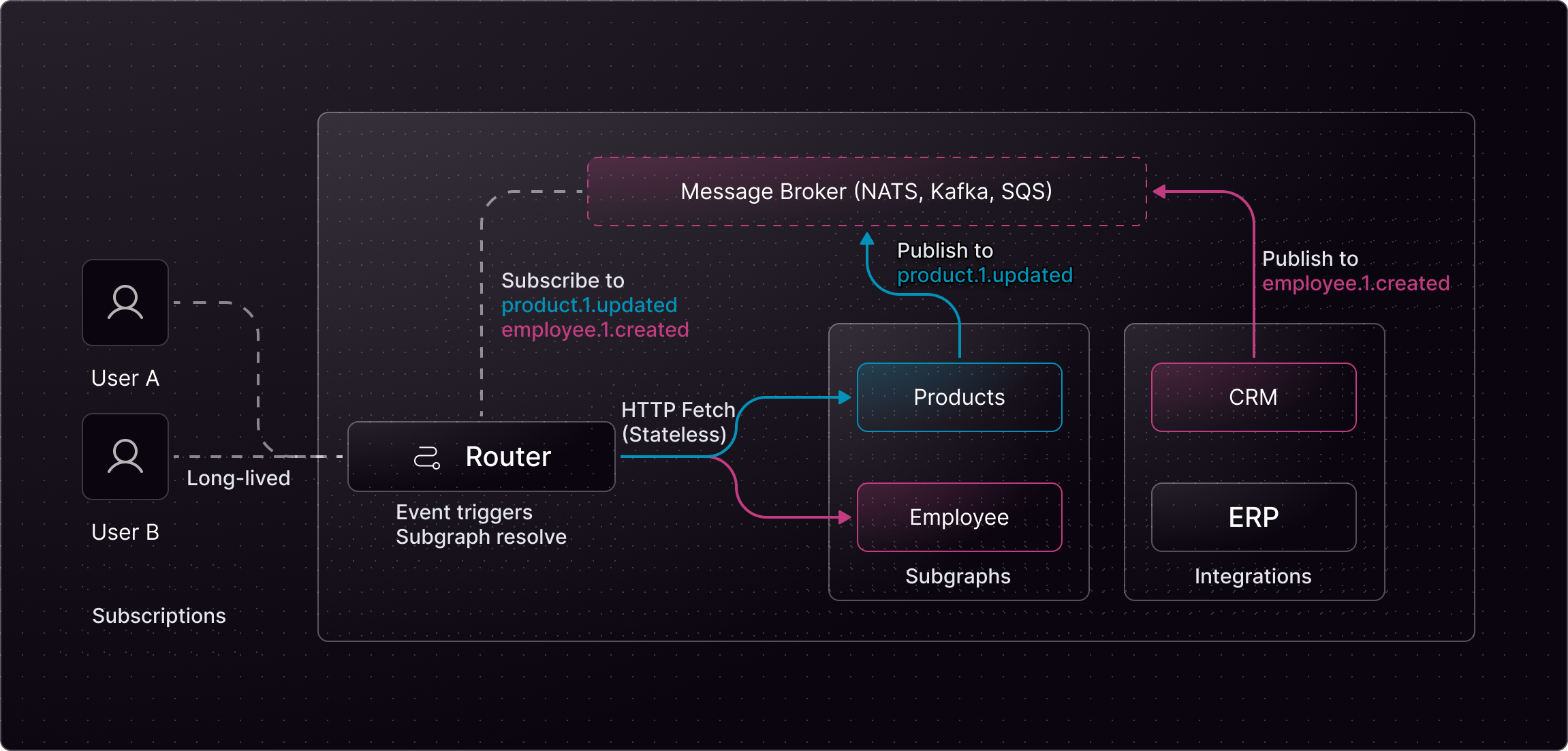
Event-Driven Federated Subscriptions (EDFS) Architecture
Introduction
Cosmo Streams doesn’t try to make traditional GraphQL subscriptions less painful. It removes the root cause of the pain altogether.Why GraphQL Subscriptions Are So Hard
GraphQL subscriptions are notoriously difficult to build and operate at scale. In a classic setup, you’re expected to run a dedicated subscription service yourself. That service must keep long-lived WebSocket connections, implement the correct GraphQL subprotocol, manage heartbeats and reconnects, listen for domain events, fetch and compose data from other services, and finally fan out updates to thousands of connected clients — all in real time. This architecture is inherently stateful. Every active subscription lives somewhere in memory. As traffic grows, so does connection overhead, memory pressure, and operational complexity. Subtle performance issues and edge-case failures are common, especially once you move beyond a few hundred clients. Federation makes things even harder. Now the router is no longer the only place dealing with subscriptions — your subgraphs must participate too. They often need to hold WebSocket connections, implement subscription loops, or support proprietary callback protocols. This creates tight coupling between your graph architecture and your runtime environment, making serverless deployments difficult or outright impossible. In short: traditional GraphQL subscriptions push state, complexity, and scalability concerns deep into every layer of your system.Cosmo Streams: A Different Model
Cosmo Streams takes a fundamentally different approach. Instead of asking subgraphs to host subscriptions, Cosmo Streams treats subscriptions as an event-driven problem, not a connection-driven one. Subgraphs remain completely stateless. They don’t manage WebSockets. They don’t track subscriptions. They don’t run subscription loops. When something changes, they simply emit an event to an existing message broker like Apache Kafka, NATS, or Redis — infrastructure most event-driven systems already rely on. The Cosmo Router listens to those events. When an event arrives, the router determines which active subscriptions are affected, efficiently deduplicates work, and fetches the required data from subgraphs using plain HTTP requests. The updated results are then broadcast to clients over WebSockets, SSE, or multipart responses — all fully managed at the gateway layer.Why This Matters
This shift has important consequences:- Stateless subgraphs Subgraphs don’t hold connections or subscription state, making them ideal for Lambda, Cloud Run, or any serverless environment.
- Centralized connection management All client connections live in the router, where they can be optimized, monitored, and scaled efficiently.
- Event-native architecture Subscriptions integrate naturally with Kafka, NATS, or Redis instead of introducing yet another stateful protocol.
- Better performance at scale The router deduplicates subscriptions, minimizes fetches, and uses highly efficient I/O primitives to handle tens of thousands of concurrent clients with low memory overhead.
- Zero subscription logic in subgraphs No WebSocket servers, no callback protocols, no proprietary APIs — just HTTP.
In More Detail
Cosmo Streams solves 3 major problems when it comes to GraphQL Federation and Subscriptions by directly connecting the Router to an event source like Kafka and NATS and making it a part of the Graph.- Subscriptions can only have one single root field
- Subgraphs should be stateless
- Maintaining 3 WebSocket Connections per client is a waste of resources
employeeUpdated field marks the root of a Subscription. With classic Federation, we’d be forced to implement this root Subscription field on a particular Subgraph. This is not ideal, because it ties the ownership of the field to one single Subgraph. If two Subgraphs contribute fields to the Employee type, which is usually the case in federated Graphs, we’d have to communicate across Subgraphs to trigger a Subscription.
In addition to the first problem, Subscriptions also make Subgraphs stateful. Each time a client connects to the Router via WebSockets, the Router has to open another WebSocket connection to the Subgraph. This means that you’re not able to use Serverless infrastructure for your Subgraphs. In addition, the deployment and maintenance simply become more complex as you have to manage a lot of open connections.
Furthermore, classic Subscriptions with Federation are quite expensive when it comes to Memory usage. When a client wants to use Subscriptions, it opens up a WebSocket connection to the Router. The Router then opens a second WebSocket Connection to the Subgraph. The Subgraph itself has to maintain another Connection. If we don’t count the client itself, that totals 3 WebSocket connections per client. Depending on the programming language and framework being used, one connection can cost multiple Megabytes of Memory, making this solution not very scalable. Imagine we had 10k clients connected, this would cost 30GB of memory if each WebSocket connection costs us 1MB of memory.
Specification
Enter Cosmo Streams, a simple way to scale Federated Subscriptions in a resource-efficient manner. Cosmo Streams supports three event providers:Kafka
NATS
Redis
@edfs__natsRequest directive is a specific NATS directive to extend a Graph through an Event Source. It makes a request to a NATS subject and waits synchronously of the response. Under the hood it uses Request/Reply semantics from NATS.
The @edfs__natsPublish, @edfs__kafkaPublish, and @edfs__redisPublish directive allows you to publish an event through a Mutation.
Using the @edfs__natsSubscribe, @edfs__kafkaSubscribe and @edfs__redisSubscribe directives, you can create a Subscription to the corresponding message bus. By default, all the provider implementations are stateless, meaning every client receives the same events in a broadcast fashion. This behavior can be adjusted. NATS allows you to create a consumer group, resulting in multiple independent streams of the subject, where each client can consume events at their own pace.
The @openfed__subscriptionFilter directive allows you to filter subscription messages based on specified conditions. For more information see Subscription Filter.
An Event-Driven Subgraph does not need to be implemented. It is simply a Subgraph Schema that instructs the Router on how to connect specific root fields to the Event Source. Scroll down for an example.
Prerequisites
To use Cosmo Streams, you need to have an Event Source running and connected to the Router. Currently, we support NATS, Kafka, and Redis. For simplicity, NATS is used to explain the examples. To get started, run a NATS instance and add the following configuration to yourconfig.yaml Router Configuration:
make edfs-demo in the Cosmo Monorepo, you’ll automatically get a NATS instance running on the default port (4222) using Docker.
Unavailable providers
By default the router will start even if an event provider referenced by the execution config is unavailable. This happens in two cases:- The provider is not defined under
events.providers. The router reports an error such asredis provider with ID my-provider is not defined. This applies to NATS, Kafka, and Redis. - The provider is defined but cannot be reached at startup (e.g. the broker is down). This applies to NATS and Redis. The Kafka client connects lazily, so a router with an unreachable Kafka broker still starts by default.
- A provider that is not defined has its data sources dropped. The affected fields cannot be queried until the provider is added to the configuration.
- A provider that is defined but unreachable keeps a client that retries the connection in the background. Its fields are temporarily unavailable. They recover automatically once the broker becomes reachable, without a router restart. This applies to NATS, Kafka, and Redis.
skip_unavailable_providers: false (or the EVENTS_SKIP_UNAVAILABLE_PROVIDERS environment variable).
config.yaml
Example Configuration
Below, you’ll find an example Schema that use the NATS provider directives to connect the@edfs__natsRequest directive to a Query root field (employeeFromEvent), a Mutation root field (updateEmployee) that’s connected to another topic using @edfs__natsPublish and a Subscription root field (employeeUpdated) that’s connected via @edfs__natsSubscribe. Each of these fields is completely independent. Important to notice is that you can’t implement this subgraph because the engine will implement the resolvers based on the router configuration.
Semantics
The “subjects” Argument
The subjects/topics/channels argument of all event directives allows you to use templating syntax to render the destination from field arguments. Given the following Schema:Request/Reply
The@edfs_natsRequest directive creates a response topic (internally) and sends the JSON representation of all arguments to the topic specified in the topic argument. The Router then waits synchronously on the response topic for the result. The Router expects all fields to be part of the response that are defined in the Entity type in this Schema, as well as the __typename field to identify the Entity. In the example, the Employee Entity contains an `id` field, so the following response would be valid:
Publish
The@edfs_natsPublish, @edfs_kafkaPublish and @edfs__redisPublish directive sends a JSON representation of all arguments, including arguments being used to render the topic, to the rendered topic. Fields using the eventsPublish directive MUST return the type edfs__PublishResult with one single field success of type Boolean!, indicating whether publishing the event was successful or not.
Given that we send the following Mutation:
updateEmployee.1:
Subscribe
Given the following Subscription:employeeUpdated.1 and waits for the next message to be published. All fields that are defined in the response entity MUST be sent to the topic to be valid. Additional fields that are not part of this “Events Subgraph” will be resolved by the Router. In addition, it is required to send the __typename field to identify the Entity.
Here’s an example of a valid message:
__typename field is missing:
__typename field because this allows Cosmo Streams to also work for Union and Interface types.
It’s worth noting that the Router will not send any responses before you publish a message on the topic. If you need the most recent result, first make a Query, and then subscribe to the Topic. The Router will send the first response only after a message is published on the rendered topic.
Subscription Filter
The@openfed__subscriptionFilter directive allows you to filter subscription messages based on specified conditions. These conditions are defined as an argument on the directive. You can also nest conditions for negations or OR queries. This directive is especially useful with Kafka when you want to segment a stream without pre-creating many topics. Kafka topic templates are supported, but the rendered topics must already exist and dynamic topic creation at runtime is generally not recommended.
Given the following subscription:
employeeUpdated and employeeUpdatedTwo only when the payload id matches the values of the IN filter condition.
Variable expansion
You can also use variable expansion to use input arguments in the filter conditions: To illustrate the use case, we do the following query:firstIds and secondIds into a single array, which is then used for the IN check.
We do not validate whether a client is allowed to subscribe to specific events or topics. If this is a blocker for you, please contact us. We have ideas on how to address this issue.
Limitations
To use the current implementation of subscription filters with variables, you’ll have to disable variables remapping.By default, a subscription like the following won’t work, because
filteredEmployeeUpdated is using a filter on firstIds and secondIds that are values resolved using variables: