> ## Documentation Index
> Fetch the complete documentation index at: https://cosmo-docs.wundergraph.com/llms.txt
> Use this file to discover all available pages before exploring further.
# Using Apollo Router / Gateway with Cosmo OSS Schema Registry
> The easiest way to migrate away from Apollo GraphOS
## What problem does it solve?
The first step to migrate from Apollo GraphOS is to move the graphs from GraphOS to WunderGraph Cosmo. Once this is done, migration from the Apollo Router/Gateway to the Cosmo router can be done gradually using the Apollo compatibility mode.
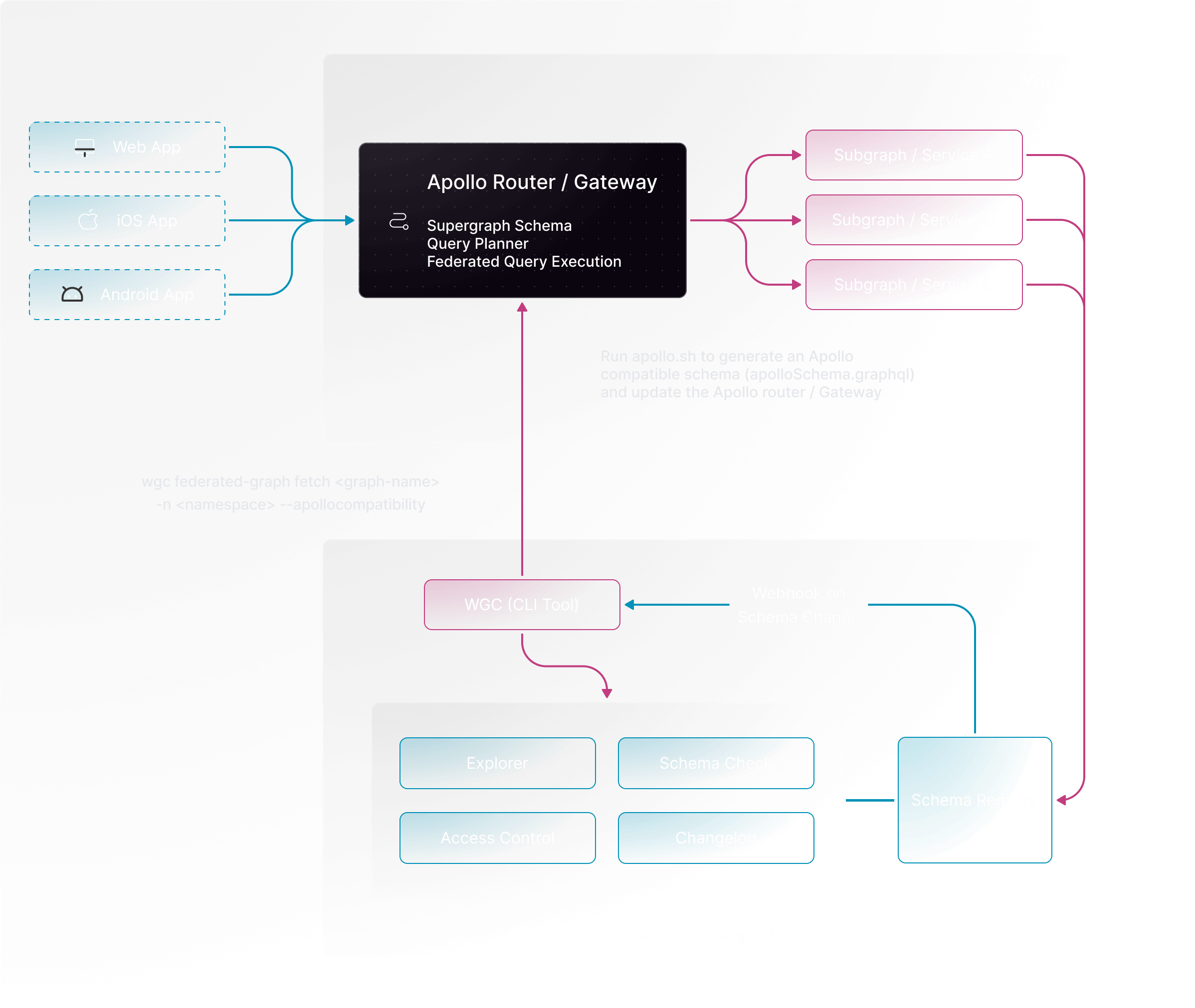 As the router/gateway can be migrated gradually, this method becomes the fastest way to initially migrate from Apollo to WunderGraph Cosmo.
## Steps to migrate
Migrate your graphs from Apollo GraphOS to WunderGraph Cosmo. It can be done in 2 ways.
* Use the [Migrate from Apollo](/studio/migrate-from-apollo) button.
* It can be done manually using the [subgraph create](/cli/subgraph/create), [subgraph publish](/cli/subgraph/publish) and [federated-graph create](/cli/federated-graph/create) commands.
Once the graphs are completely migrated, we have to implement a webhook which runs the [fetch command](/cli/federated-graph/fetch) to generate the supergraph schema, which can be used to update the router/gateway.
Now, we can set a [webhook alert](/studio/alerts-and-notifications/webhooks#how-to-set-up-webhook-notifications) on Cosmo.
## Demo project with step-by-step instructions
Now, let's walk through the steps with the help of a [demo project](https://github.com/wundergraph/apollo-federation-compatibility-demo)
Create an [API key](/studio/api-keys) on Cosmo.
Let's set up the graphs on Cosmo by running the command `make setup-cosmo COSMO_API_KEY=`.
Populate the Cosmo API key and the webhook secret as environment variables in the Webhook-app folder.
Start the webhook server by running the command `make run-webhook-app` from the root.
Set up the webhook alert on Cosmo, by providing the endpoint, and the secret and then select the FEDERATED\_GRAPH\_SCHEMA\_UPDATED event with the above-created graph.
Now, let's make a small change in one of the subgraphs and [publish](/cli/subgraph/publish) that subgraph.
On publish, the webhook would be triggered and the supergraph schema from Apollo would be generated.
Start the subgraphs by running the command `make run-subgraphs`.
Now we can run the Apollo Gateway using the command `make run-apollo-gateway` or run the Apollo Router using the command `make run-apollo-router`.
As the router/gateway can be migrated gradually, this method becomes the fastest way to initially migrate from Apollo to WunderGraph Cosmo.
## Steps to migrate
Migrate your graphs from Apollo GraphOS to WunderGraph Cosmo. It can be done in 2 ways.
* Use the [Migrate from Apollo](/studio/migrate-from-apollo) button.
* It can be done manually using the [subgraph create](/cli/subgraph/create), [subgraph publish](/cli/subgraph/publish) and [federated-graph create](/cli/federated-graph/create) commands.
Once the graphs are completely migrated, we have to implement a webhook which runs the [fetch command](/cli/federated-graph/fetch) to generate the supergraph schema, which can be used to update the router/gateway.
Now, we can set a [webhook alert](/studio/alerts-and-notifications/webhooks#how-to-set-up-webhook-notifications) on Cosmo.
## Demo project with step-by-step instructions
Now, let's walk through the steps with the help of a [demo project](https://github.com/wundergraph/apollo-federation-compatibility-demo)
Create an [API key](/studio/api-keys) on Cosmo.
Let's set up the graphs on Cosmo by running the command `make setup-cosmo COSMO_API_KEY=`.
Populate the Cosmo API key and the webhook secret as environment variables in the Webhook-app folder.
Start the webhook server by running the command `make run-webhook-app` from the root.
Set up the webhook alert on Cosmo, by providing the endpoint, and the secret and then select the FEDERATED\_GRAPH\_SCHEMA\_UPDATED event with the above-created graph.
Now, let's make a small change in one of the subgraphs and [publish](/cli/subgraph/publish) that subgraph.
On publish, the webhook would be triggered and the supergraph schema from Apollo would be generated.
Start the subgraphs by running the command `make run-subgraphs`.
Now we can run the Apollo Gateway using the command `make run-apollo-gateway` or run the Apollo Router using the command `make run-apollo-router`.