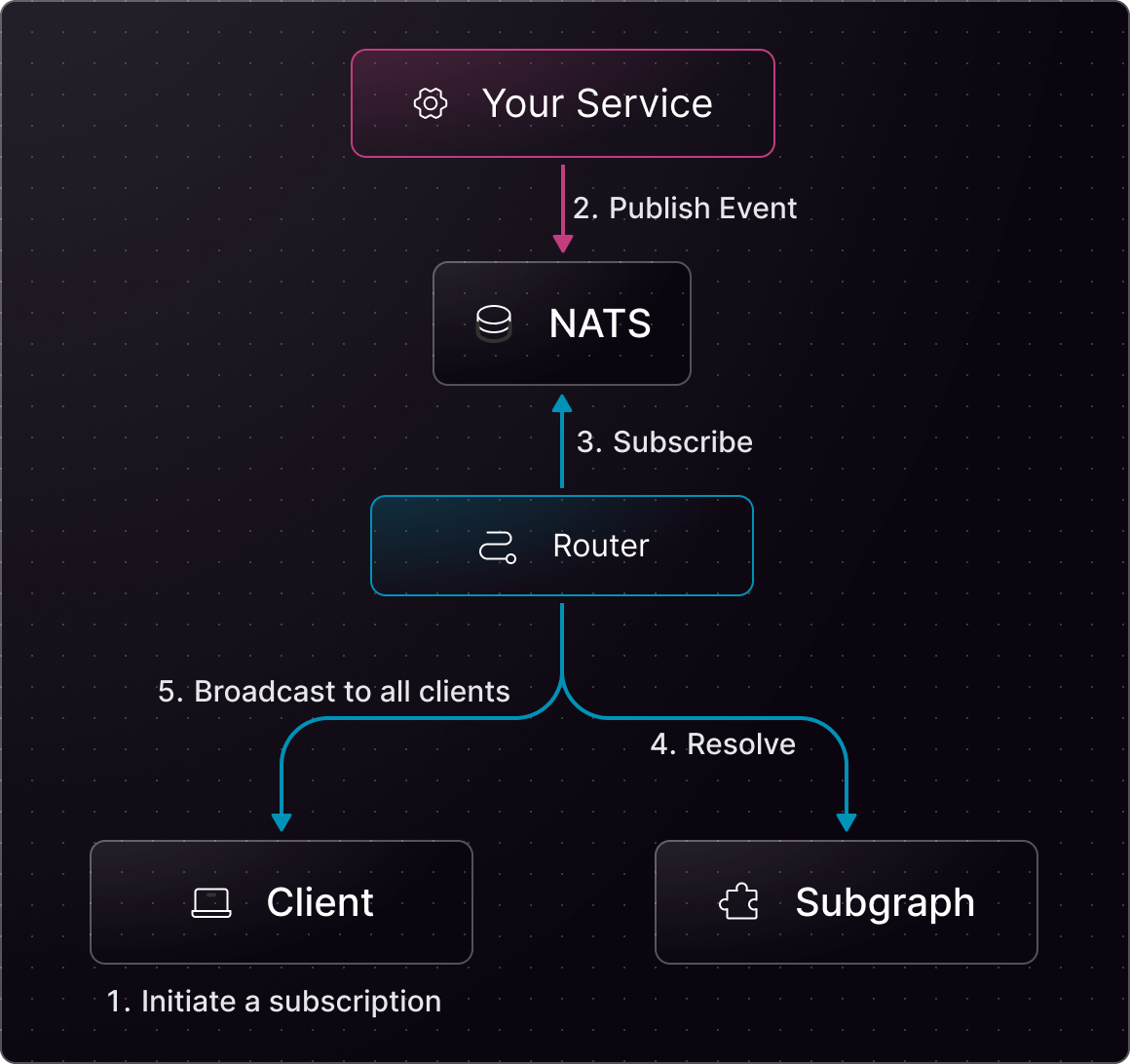
> ## Documentation Index
> Fetch the complete documentation index at: https://cosmo-docs.wundergraph.com/llms.txt
> Use this file to discover all available pages before exploring further.
# NATS
> NATS event provider support for Cosmo Streams
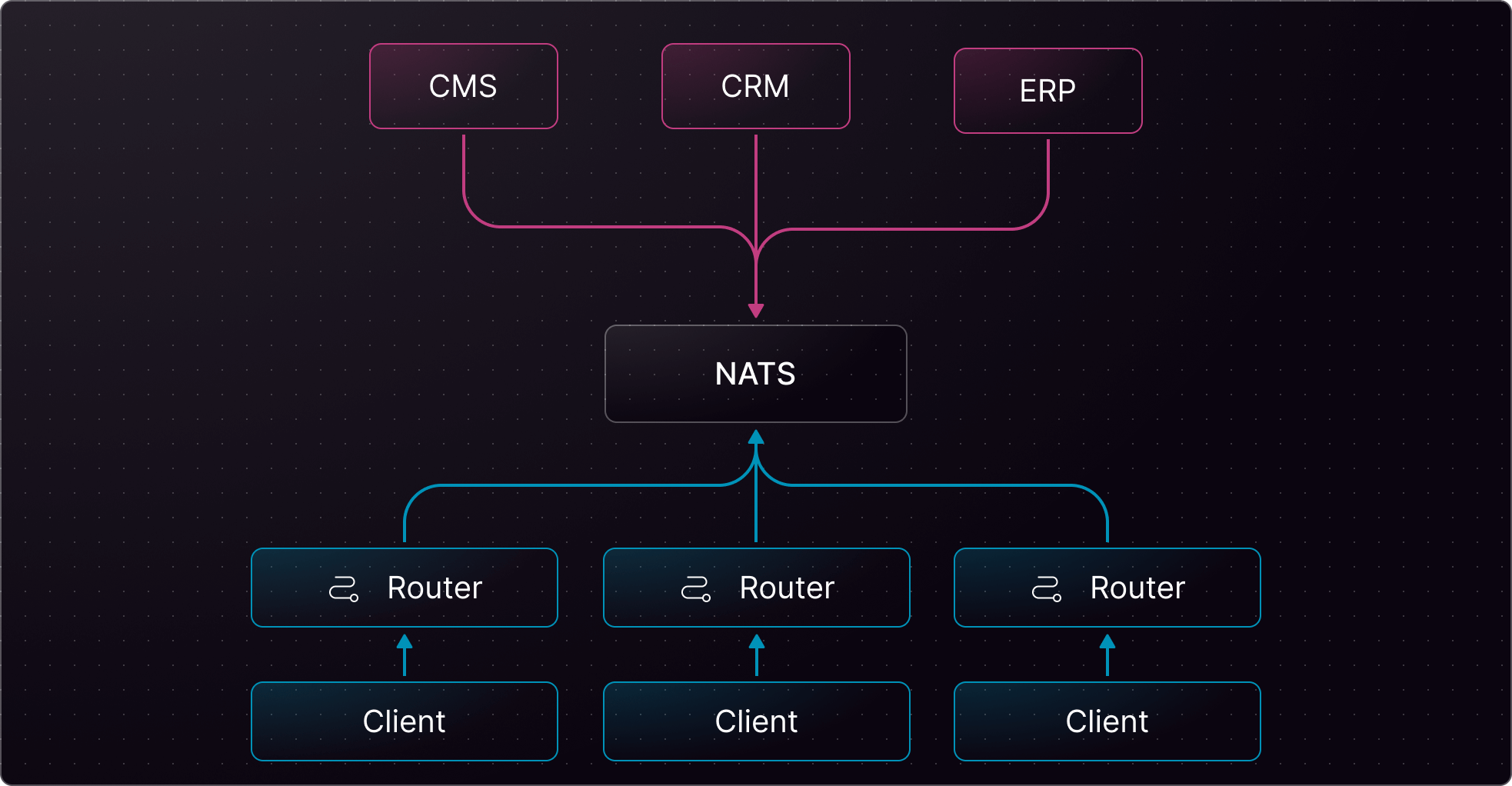 ## Minimum requirements
| Package | Minimum version |
| ------------ | --------------- |
| controlplane | 0.88.3 |
| router | 0.88.0 |
| wgc | 0.55.0 |
## Full schema example
Here is a comprehensive example of how to use NATS with Cosmo Streams. This guide covers request, publish, subscribe directive. All examples can be modified to suit your specific needs. The schema directives and `edfs__*` types belong to the Cosmo Streams schema contract and must not be modified.
```js theme={"system"}
# Cosmo Streams
directive @edfs__natsRequest(subject: String!, providerId: String! = "default") on FIELD_DEFINITION
directive @edfs__natsPublish(subject: String!, providerId: String! = "default") on FIELD_DEFINITION
directive @edfs__natsSubscribe(subjects: [String!]!, providerId: String! = "default", streamConfiguration: edfs__NatsStreamConfiguration) on FIELD_DEFINITION
type edfs__PublishResult {
success: Boolean!
}
input edfs__NatsStreamConfiguration {
consumerInactiveThreshold: Int! = 30
consumerName: String!
streamName: String!
}
# Custom
type Query {
employeeFromEvent(id: Int!): Employee! @edfs__natsRequest(subject: "getEmployee.{{ args.id }}", providerId: "my-nats")
employeeFromEventMyNats(employeeID: Int!): Employee! @edfs__natsRequest(subject: "getEmployeeMyNats.{{ args.employeeID }}", providerId: "my-nats")
}
input UpdateEmployeeInput {
name: String
email: String
}
type Mutation {
updateEmployeeMyNats(employeeID: Int!, update: UpdateEmployeeInput!): edfs__PublishResult! @edfs__natsPublish(subject: "employeeUpdatedMyNats.{{ args.employeeID }}", providerId: "my-nats")
}
type Subscription {
employeeUpdated(employeeID: Int!): Employee! @edfs__natsSubscribe(subjects: ["employeeUpdated.{{ args.employeeID }}"])
employeeUpdatedMyNats(id: Int!): Employee! @edfs__natsSubscribe(subjects: ["employeeUpdatedMyNats.{{ args.id }}", "employeeUpdatedMyNatsTwo.{{ args.id }}"], providerId: "my-nats")
employeeUpdatedNatsStream(id: Int!): Employee! @edfs__natsSubscribe(subjects: ["employeeUpdated.{{ args.id }}"], streamConfiguration: { consumerName: "consumerName", streamName: "streamName"}, providerId: "my-nats")
}
# Subgraph schema
type Employee @key(fields: "id", resolvable: false) {
id: Int! @external
}
```
You can create the Event-Driven Graph (EDG—an abstract subgraph) with the following [wgc](/cli/intro) command:
```js theme={"system"}
wgc subgraph publish edg --namespace default --schema edg.graphqls
```
## Router configuration
Based on the example above, you will need a compatible router configuration.
```yaml config.yaml theme={"system"}
events:
providers:
nats:
- id: my-nats
url: "nats://localhost:4222"
authentication:
token: "token" # or
user_info:
username: "username"
password: "password"
```
## Example Query
In the example query below, one or more subgraphs have been implemented alongside the Event-Driven Graph to resolve any other fields defined on `Employee`, e.g., `tag` and `details.surname`.
Event-Driven Graphs (EDGs) do not define resolvers, and can only define fields that compose an entity's primary key(s).
```js theme={"system"}
subscription {
employeeUpdated(employeeID: 1) {
id # resolved by the Event-Driven Graph (through the event)
tag # resolved by another subgraph
details { # resolved by another subgraph
surname
}
}
}
```
## System diagram
## Minimum requirements
| Package | Minimum version |
| ------------ | --------------- |
| controlplane | 0.88.3 |
| router | 0.88.0 |
| wgc | 0.55.0 |
## Full schema example
Here is a comprehensive example of how to use NATS with Cosmo Streams. This guide covers request, publish, subscribe directive. All examples can be modified to suit your specific needs. The schema directives and `edfs__*` types belong to the Cosmo Streams schema contract and must not be modified.
```js theme={"system"}
# Cosmo Streams
directive @edfs__natsRequest(subject: String!, providerId: String! = "default") on FIELD_DEFINITION
directive @edfs__natsPublish(subject: String!, providerId: String! = "default") on FIELD_DEFINITION
directive @edfs__natsSubscribe(subjects: [String!]!, providerId: String! = "default", streamConfiguration: edfs__NatsStreamConfiguration) on FIELD_DEFINITION
type edfs__PublishResult {
success: Boolean!
}
input edfs__NatsStreamConfiguration {
consumerInactiveThreshold: Int! = 30
consumerName: String!
streamName: String!
}
# Custom
type Query {
employeeFromEvent(id: Int!): Employee! @edfs__natsRequest(subject: "getEmployee.{{ args.id }}", providerId: "my-nats")
employeeFromEventMyNats(employeeID: Int!): Employee! @edfs__natsRequest(subject: "getEmployeeMyNats.{{ args.employeeID }}", providerId: "my-nats")
}
input UpdateEmployeeInput {
name: String
email: String
}
type Mutation {
updateEmployeeMyNats(employeeID: Int!, update: UpdateEmployeeInput!): edfs__PublishResult! @edfs__natsPublish(subject: "employeeUpdatedMyNats.{{ args.employeeID }}", providerId: "my-nats")
}
type Subscription {
employeeUpdated(employeeID: Int!): Employee! @edfs__natsSubscribe(subjects: ["employeeUpdated.{{ args.employeeID }}"])
employeeUpdatedMyNats(id: Int!): Employee! @edfs__natsSubscribe(subjects: ["employeeUpdatedMyNats.{{ args.id }}", "employeeUpdatedMyNatsTwo.{{ args.id }}"], providerId: "my-nats")
employeeUpdatedNatsStream(id: Int!): Employee! @edfs__natsSubscribe(subjects: ["employeeUpdated.{{ args.id }}"], streamConfiguration: { consumerName: "consumerName", streamName: "streamName"}, providerId: "my-nats")
}
# Subgraph schema
type Employee @key(fields: "id", resolvable: false) {
id: Int! @external
}
```
You can create the Event-Driven Graph (EDG—an abstract subgraph) with the following [wgc](/cli/intro) command:
```js theme={"system"}
wgc subgraph publish edg --namespace default --schema edg.graphqls
```
## Router configuration
Based on the example above, you will need a compatible router configuration.
```yaml config.yaml theme={"system"}
events:
providers:
nats:
- id: my-nats
url: "nats://localhost:4222"
authentication:
token: "token" # or
user_info:
username: "username"
password: "password"
```
## Example Query
In the example query below, one or more subgraphs have been implemented alongside the Event-Driven Graph to resolve any other fields defined on `Employee`, e.g., `tag` and `details.surname`.
Event-Driven Graphs (EDGs) do not define resolvers, and can only define fields that compose an entity's primary key(s).
```js theme={"system"}
subscription {
employeeUpdated(employeeID: 1) {
id # resolved by the Event-Driven Graph (through the event)
tag # resolved by another subgraph
details { # resolved by another subgraph
surname
}
}
}
```
## System diagram